Resize rounded rectangle in Photoshop
Aesthetic interfaces aren't easy work. Most designers are working with Photoshop to achieve their best. Rounded corner rectangles are one of the most widely used techniques in interfaces design. While designing in Photoshop, we have Shape tool (U) which gives us an easy option to create rounded rectangles. But most designers suffer from hell when they try to resize these kinds of rounded rectangles.
See below what most designers make when we resize rounded rectangles.
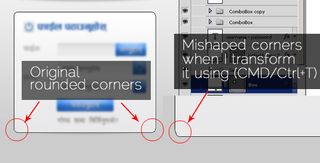
This is what happens when we try to transform a rounded rectangle with the known old technique, CTRL/CMD + T. Today I am going to share with you a quick tip on how to transform/resize rounded rectangles without messing its radius value.
This is a very quick tip on Photoshop. It's easy to resize a rounded rectangle with three easy steps. See image & follow three steps to successfully transform / resize a rounded rectangle in Photoshop.
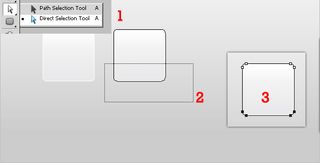
Steps to resize rounded rectangles in Photoshop
a.) Choose direct selection tool (Simply press "A")
b.) Drag to select any two corners of the rectangle, like in image above (step 2)
c.) Now, it's all done - just press "Shift" & press "Down arrow" on your keyboard.
That's it. You are done. [ Shift for straight line.] No CTRL/CMD + T required to resize a rounded rectangle.
See final output
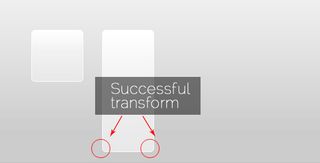
So, isn't it quite easy? Simple, right? You also may have a trick to achieve the same results, please share in comments below.