How to remove black border around input buttons in IE 7?
Here I am sharing a bullet proof working solution to remove the ugly black border around IE 7 input buttons.
Problem
The problem is there when a submit button is inside the form element. Click outside the form, form focus is gone, thus the black border is gone. But the form is focused when the page loads so the problem exists there.
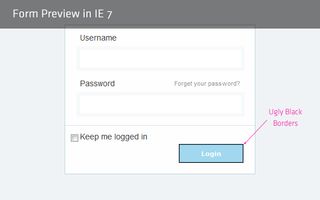
Not working solution
Everyone suggests to add outline:none to fix this problem, since outline property is not supported by IE7, I say that this is a non-working solution.
Bullet proof Solution
Just one property is required to get rid of this black border. Open your reset css file and add these lines:
input[type=submit],
input[type=reset],
input[type=button]
{
       filter:chroma(color=#000000);
}
Why in reset css file?
Because the problem is for all buttons in IE 7, since adding this fix in reset.css will fix our problem in entire site.
That's it. All black borders are gone now. The fix is tried/tested against IE 7.
Result
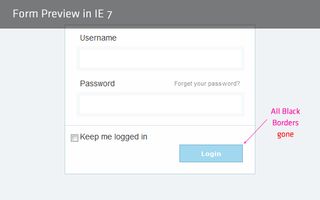
Better if you put this fix in IE7-CSS file.
Similar IE 7 Quick Trick
How does that sound to you? Isn't it helpful :).